I have always been into technology, I recall one of my first rigs was a Windows 2000 POS my dad picked up for £100 which I used to play Sim City 2000 on. To launch the game you had to exit out of the Desktop Environment into the shell, and type in a command to launch the game from the floppy disk. Much of my childhood was spent on the cusp of going from being into technology to actually being good with technology, much because of the warnings of my parents that “there is no money in it”. Despite their efforts to focus my attention elsewhere, such as mathematics history and economics, I still picked up a lot of IT knowledge due to natural understanding of these systems. I found myself swanning through subjects I found easy but not interesting, and eventually found myself in 2020 in the last year of my Economics Degree.
I hate the education system - I have made peace with many of my libertarian gripes with government-led infrastructure, but my disgust with the education system is not a dead horse I am ready to stop beating yet. I learnt a vast amount from my time university and I assure you not an ounce of it was economics, and by my third year I was disenchanted and fed up with what I now called “the educational industrial complex”, I just wanted out. I also however was not an idiot, and I understood abandoning the road more traveled by without a plan was tantamount to career suicide. So when the entire world began shutting its doors due to a nasty virus originating from China my natural reaction was “excellent, I have two weeks to figure out what the fuck to do with my life”. It was not two weeks - I actually cannot quite pinpoint when lockdown really ended, I just know at some point everyone in the UK just stopped caring and went about their day. I do know that about a week in I found this video (after all there is only so much Civ V you can play before you need something else to distract yourself with):
Tie that in with a discord server I was in needing someone to code a new bot, and suddenly every warning my parents ever fed me regarding the lack of a future I would have if I pursued tech as a career was deemed null and void. I went deep very quickly - programming, selfhosting, linux became all I did and wanted to do for all hours of the day. It was the only thing that actually excited me in years, and I happily fucked off my not so exciting career in economics in favour of a tech based career.
I often get people criticize my homelab for being overcomplicated and pointless, and yes I do agree with them - It probably doesn’t benefit me too much running my own instance of gitlab, it probably is incredibly overkill to run everything via a GitOps workflow, I definitely do not need grafana to monitor a few VMs… I have a colleague I work with who is this type of person, and I remember once mentioning I have always wanted to watercool a PlayStation2. His reaction was to tell me it is pointless because emulation has come far enough I could have a better experience just running the PS2 games on my phone - some people will never understand that the point of watercooling a Playstation2 justifies itself, and the same can be said in my homelab. I run enterprise hardware and patterns because I want to deal with enterprise problems and learn why enterprise solutions exist. There is a breed of helpdesk workers coming in who I called cloud-born, and I do this because they don’t know On-Prem AD, SCCM, or PXE - Azure has replaced these. Meanwhile when Azure breaks it’s my group who understand the fundamentals from working with these techs such that we can just fix the issue, regardless of UI or Syntax.
I say all of this, but I do have a massive blindspot in my homelab and knowledge and that is networking… And thus was born Project Blackwall.
Table of Contents
- The Plan
- The Execution - A tale of Shielded Twisted Pairs and Moscow Mules
- Step 1: The Green Mile Switch Retirement
- Step 2: Hubris in the Face of Daemons
- Step 3 - The Secret Handshake That Wasn’t
- Step 4 - Men Will Literally Write Bash Scripts Instead of Unplugging a Cable
- Step 5 - Caesar Also Had to Build His Walls Before He Could Man Them
- Step 6 - Scary Nameservers and Nice Zone Files
- Step 7 - Authentik, and Everything Else That Needed Doing
- Conclusion
The Plan
This is not a new idea for the record - For as long as I have wanted servers I have wanted a network that matches its technical depth… My attitude has however changed as time has gone on.

When I originally had plans for my dream homelab I just wasn’t that much into networking. My idea of a “cool home network” came from Linus Tech Tips and Network Chuck, and in almost every one of these cases they seemed to lean heavily on Ubiquiti equipment. I understand this though, Ubiquiti is the “apple” of prosumer networking equipment - Its sleek, works great, and is expensive enough you think you are buying that real gourmet shit. So when I see YouTubers I look up too, and all my friends who are already into homelabbing all running dream machines and UniFi switches, it is not that hard to imagine my original plan was to do the same. I then saw a TikTok from a network engineer called Lexi Cooper basically poking fun at guys who run Ubiquiti homelabs… Now I am not saying I changed my entire plan because a pretty girl on the internet challenged my masculinity, but it played a part….
The choice was always between running MikroTik and OPNsense OR UniFi. The long term plan for my homelab for a physical perspective is redundancy, which long term for me (as far as networking goes) meant
- Two WAN connections
- Two Routers
- Two Core switches
Ubiquiti being ubiquiti can handle all this easily - They have switches that can work together as a pair, the dream machine do shadow mode so if one fails you won’t lose connection, they provide a tool to get a 4G connection into your routers, you can jack directly into the routers without a modem… It just works. OpenTik (yes im mixing OPNsense and MikroTik together for the rest of the post, it is easier and idc) on the other hand will allow this but I will need to handle it all myself. That means learning protocols like CARP for HA router failover, wrestling with MLAG and STP so my dual core switches don’t accidentally create a broadcast storm which takes everything down, and manually writing the policy-based routing for my multi-WAN failover instead of just buying a plug-and-play LTE dongle. It means that when a piece of hardware dies or a fiber line gets cut, the failover isn’t handled by a proprietary magic box - it is handled by rule I wrote, tested, and will inevitably have to troubleshoot at 2AM butt naked with a shift that starts in five hours. There is no UniFi dashboard to hold my hand, no one-click shadow mode to save me, and no one to blame but myself when my internet drops.
So when I saw this video from the pretty girl on the internet, despite the seed it planted, I still intended to go UniFi with the excuse of “I don’t want to be a network engineer in my own home”. This logic actually stuck around until the exact moment I had to choose between Peace or Pain, and I chose pain. I had £750 saved, and with that I bought the following:
- A MikroTik CRS328-24P-4S+RM switch for £200 (yes, I somehow found one for that cheap)
- A PowerEdge R330 for £250
- A DrayTek Vigor 166 for £125
- A TP-Link WiFi7 AP for £90
Some of these items were far more expensive than I would have liked, and some were far cheaper than I would have liked - for better or worse however, I have them… And so begins my march into the maw of TCP desolation.
In the Cyberpunk universe, the Blackwall is a highly advanced, global ICE (Intrusion Countermeasures Electronics) barrier built by Netwatch to isolate the corrupted, rogue-AI-infested remnants of the Old Net from the modern, usable networks. It serves as a literal digital wall to prevent these malevolent programs from breaching and destroying human infrastructure. It is the mother of all firewalls, and represents not only a barrier but a total overhaul of networking in that universe. My project is called Project Blackwall because I installed a router; I executed a complete, ground-up overhaul of my home infrastructure to kill the trusting “Old Net” of my flat 10.0.0.0/16 network (lets ignore that OldNet is the name of my previous two Pi 4 homelabs I had at my parents’ house). This project encompasses
- A bare metal OPNsense server acting as the outer ICE.
- The deployment of Bind9 to enforce absolute split-horizon DNS routing with plaintext files that work well with IAC.
- The segmentation of my network into strict isolated VLANS.
- The deployment of an identity provider into a dedicated infrastructure tier to act as the ultimate-zero trust identity gatekeeper
It is the transition of a network that assumed everything is safe, to a network that matches the paranoid schizophrenic ramblings of someone who has seen the other side of the blackwall and knows the dangers it holds back.
The VLANS
At its core, this is my VLAN plan
| VLAN | Name | Subnet | Group | Purpose | Allowed Connections | Rate Limit |
|---|---|---|---|---|---|---|
| 10 | Services | 10.67.10.0/24 | Core Services | Application and service traffic | Infrastructure, Storage, DMZ | Unlimited |
| 20 | Storage | 10.67.20.0/24 | Core Services | Storage and data-plane traffic | Services, Endpoints | Unlimited |
| 30 | DMZ | 10.67.30.0/24 | Perimeter Security | Public ingress and externally exposed connectors | WAN, explicitly allowed Services | Unlimited |
| 40 | Infrastructure | 10.67.40.0/24 | Core Services | Internal infrastructure and operational services | Services, Storage, DMZ, Management | Unlimited |
| 45 | Management | 10.67.45.0/24 | Network Admin | Administrative interfaces and device management | No direct access from user VLANs | Unlimited |
| 50 | Guest | 10.67.50.0/24 | User Devices | Untrusted endpoint devices | Internet only | 15 Mb/s Down / 1 Mb/s Up |
| 60 | Endpoint Devices | 10.67.60.0/24 | User Devices | Trusted user devices | Services, Storage, Infrastructure | Unlimited |
| 70 | IoT | 10.67.70.0/24 | IoT | IoT devices isolated from the rest of the network | Internet only | 15 Mb/s Down / 1 Mb/s Up |
If you are looking at this and saying “Eddie, you live alone… why the hell do you need eight distinct network enclaves?” - congratulations, you are the exact target audience for this post. This is micro-segmentation: a standard enterprise pattern designed to enforce a Zero-Trust posture. In the “Old Net”, if a single device was compromised, the entire network was compromised. Under Project Blackwall, if a zone gets breached, the firewall clamps down, the threat is quarantined, and the rest of the infrastructure keeps humping along. The important thing to understand here is that these VLANs are not arbitrary buckets of devices; they represent distinct trust boundaries and traffic roles. One of the major mindset changes I had during the Planning and Designing of Blackwall was that machines and traffic are distinct entities within modern IT infrastructure. You cannot take for granted one device, one IP, one network. You need to ask and answer questions like “who talks to what”, “why do they get to talk to them”, “what happens if that trust is abused.”
Here is a breakdown of why these zones exist and how they are structurally policed:
-
The Application & Data Plane (
VLAN 10&VLAN 20) - VLAN 10 is where the actual services live: Nextcloud, GitLab, Jellyfin, internal reverse proxies, and eventually Kubernetes workloads. This is the layer users and applications actively interact with. VLAN 20, meanwhile, exists purely for storage traffic. My TrueNAS shares live here, isolated from the service layer itself. By separating compute from storage, I can optimize the MikroTik switch for high-throughput east-west traffic while also ensuring that a compromised application container cannot immediately start scrubbing underlying datasets. The applications may consume the data, but they do not inherently own the storage layer itself. -
The Sandbox (
VLAN 30) - The DMZ (Demilitarized Zone) is the firing line. One of the more interesting realizations I had while designing Blackwall was that the DMZ is not “the reverse proxy VLAN”; it is the external ingress VLAN. Internal routing and reverse proxying can still happen safely inside VLAN 10, but anything maintaining external connectivity or accepting unsolicited inbound traffic belongs in the DMZ. In my case this means things like Pangolin tunnel connectors and any future internet-facing ingress points. Importantly, the DMZ is not completely isolated from the rest of the network - that would make it useless. Instead, it is only allowed to communicate with explicitly approved internal services. If something in the DMZ gets compromised, the attacker does not magically inherit the rest of the network, they inherit a very angry firewall. -
The Brains (
VLAN 40) - VLAN 40 is the operational nervous system of Blackwall. This is where infrastructure services live: Bind9 split-horizon DNS, Authentik, monitoring stacks, orchestration platforms like Komodo, and eventually NetBox. These are not end-user applications; they are the systems that make the rest of the environment function. If VLAN 10 is the body, VLAN 40 is the autonomic nervous system quietly keeping the organs alive in the background. One of the major architectural shifts during this project was realizing that “infrastructure” and “management” are not actually the same thing. Infrastructure services are consumed by systems. Management interfaces are consumed by me. -
The Control Plane (
VLAN 45) - VLAN 45 exists for administrative interfaces only: Proxmox, MikroTik, OPNsense, iDRAC, switch management, AP management, and anything else whose sole purpose is controlling infrastructure rather than providing it. This network is effectively the crown-jewel enclave of Blackwall. You cannot route into it from guest devices, IoT devices, or random application containers. To access it I have to deliberately place myself into the management zone. This means that even if a server or endpoint gets compromised, lateral movement into the actual control plane becomes dramatically more difficult. -
Human & Trash Subnets (
VLAN 50,VLAN 60,VLAN 70)- VLAN 60 (Endpoints) is for my trusted devices e.g. my phone, laptop, and desktop. These devices need legitimate access to the service and storage layers because I actually need to get work done.
- VLAN 50 (Guest) is for anybody visiting. They get internet access, strict bandwidth limits, and absolutely zero visibility into the rest of the network.
- VLAN 70 (IoT) is the quarantine zone for the “smart” trash. Cheap light bulbs, smart plugs, TVs, and appliances are notoriously insecure, rarely updated, and constantly phoning home to random servers. Not only is this zone restricted entirely to the internet with strict bandwidth caps, but I am implementing client isolation at the switch layer. Even devices on the same subnet are not allowed to communicate with one another. If a rogue firmware update turns a smart bulb into a botnet node, I do not want it scanning the rest of my infrastructure like it just discovered Nmap for the first time.
I have a phrase I like to remind people of whenever possible: on a long enough timeline, all systems can and will be hacked. Too many people are obsessed with building a perimeter while completely neglecting what happens once something gets through the wall. Blackwall is not about pretending compromise is impossible. It is about ensuring compromise has boundaries.
In practice, this is going to complicate various aspects of my homelab. One of the most immediate examples is that each VM will now require at least two NICs: one for management traffic and one for service traffic. One interface will exist purely for administration (e.g. SSH), while the other will exist for exposing actual applications and services (e.g. Homepage). This by itself is not especially complicated, just operationally annoying. Things become significantly murkier when you start considering systems like GitLab. Is GitLab a service, or is it infrastructure? I use it as both. It is simultaneously a user-facing application, a deployment platform, a GitOps control surface, and effectively part of the operational nervous system of the environment itself. To be brutally honest, at the time of writing this, I do not entirely know where systems like that belong yet, and I suspect that is simply the reality of projects like Blackwall. Not every architectural decision has a clean, objective answer. The obvious solution would be to operate two separate GitLab instances: one for users and one for infrastructure. But this is where infrastructure design collides head-first with reality.
I will not get into detail about who this was or what company they worked for, but a friend of mine works in cybersecurity for a fairly large logistics operator in America. Their email infrastructure is not secured especially well by modern standards. They do not even have SPF enabled. To the average techie this sounds like outright heresy, but this decision was intentional. When the company was first established, they wanted people to be able to impersonate company email addresses freely for marketing and automation purposes, and over time that operational convenience became embedded into the business itself. This is the balancing act infrastructure design forces upon you: security versus usability. The “perfect” architecture on paper is not always the correct architecture in reality. To put it as poetically as possible, I neither have the patience nor the emotional regulation to maintain two separate GitLab instances without eventually blowing my own head off. Due to this, the obvious solution is not necessarily the best solution.
I suspect I am going to encounter many more philosophical quandaries like this as the migration continues.
The Rack
Before I kick this section off I just want to clarify something - servers, especially servers with hard drives in them, are heavy. There is a reason why patchbox sells the setup.exe. Anybody who has ever tried to balance a 2U storage server on their knees while blind-threading a cage nut into a rack rail knows this pain intimately. If you have a server rack, you understand the importance of long term planning, not just for space but reducing asset movement. Whenever I need to do anything to my rack I ask myself three questions:
- Where am I now?
- What do I need to do?
- How do I do this in a way that limits the amount things I am going to have to rerack in the long term?
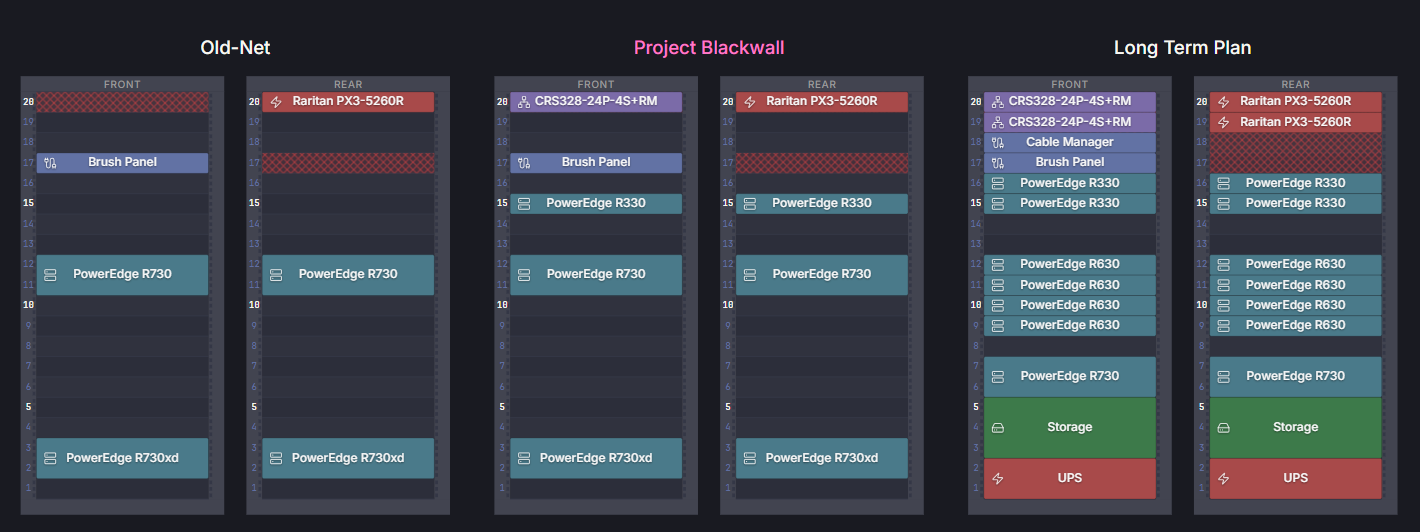
So I am going to answer these three questions with the following diagram (made with Rackula)
Where am I now?
If you look at the Old-Net configuration, it’s the classic layout of someone who bought a server and forgot about networking. I have my PowerEdge R730xd anchored at the bottom (mainly because it was difficult enough just to get it there), a compute node in the middle, and a Raritan PDU at the very top rear. U20 is empty, because my core switching wasn’t even worth putting on the diagram because it was that tired, 8-port unmanaged Netgear desktop switch dangling by a thread and a prayer behind the server chassis.
What do I need to do? This is the immediate phase shift. To deploy Project Blackwall without ripping the entire rack apart in six months, I had to be incredibly calculated about where the switch and the server went:
- U20 (Front): The new MikroTik CRS328-24P-4S+RM takes its rightful place at the absolute top of the rack.
- U15 (Front & Rear): The new Dell PowerEdge R330 is slotted in right above the main R730 compute node. It acts as the physical, bare-metal outer ICE running OPNsense.
Now in initial designs I was actually going to put my Router at the top of the rack and switch underneath, I then started studying Network+ and found out about “Top of Rack Switches”. I anticipate at some point in my adult life I may get a second rack, and have planned accordingly. By putting the R330 into U15, I preserve a clean, logical flow of cables from the top-of-rack switch down through the brush panel, while keeping the heavy lift of the existing R730 and R730xd completely undisturbed. I didn’t have to re-rack a single piece of my old legacy kit to make this phase happen.
Designing for the Endgame (The Long Term Plan) This is where the paranoid, data center-grade design reveals itself. If you look at the Long Term Plan column, you can see exactly why the current Project Blackwall layout looks a bit fragmented with those empty gaps.
I am completely anticipating success… and hardware failure:
- The Switching Fabric Cluster: U19 is left entirely empty right now so that its eventual twin (a second MikroTik CRS328) can slide right in underneath the primary switch for a high-availability MLAG deployment.
- The Firewall Cluster: The R330 in U15 is positioned so that a secondary, high-availability OPNsense node can slide directly into U16. If one node drops a power supply or panics during a kernel update at 2 AM, CARP will silently hand over the WAN to its identical twin right next to it.
- The Compute Engine: The middle layers will eventually be completely backfilled by a dense stack of four PowerEdge R630 nodes to handle proper high-availability virtualization clustering, pushing the old R730 down into a dedicated legacy/utility tier.
By sacrificing a few units of empty space today, I have completely modularized the rack. When payday rolls around for the secondary hardware phases, the backup tin will slide straight into its designated slot without a single active cable or server needing to move a single millimeter. God help my electricity bill… and the environment too I guess.
All this aside there is another fact which it is easier to show rather than tell
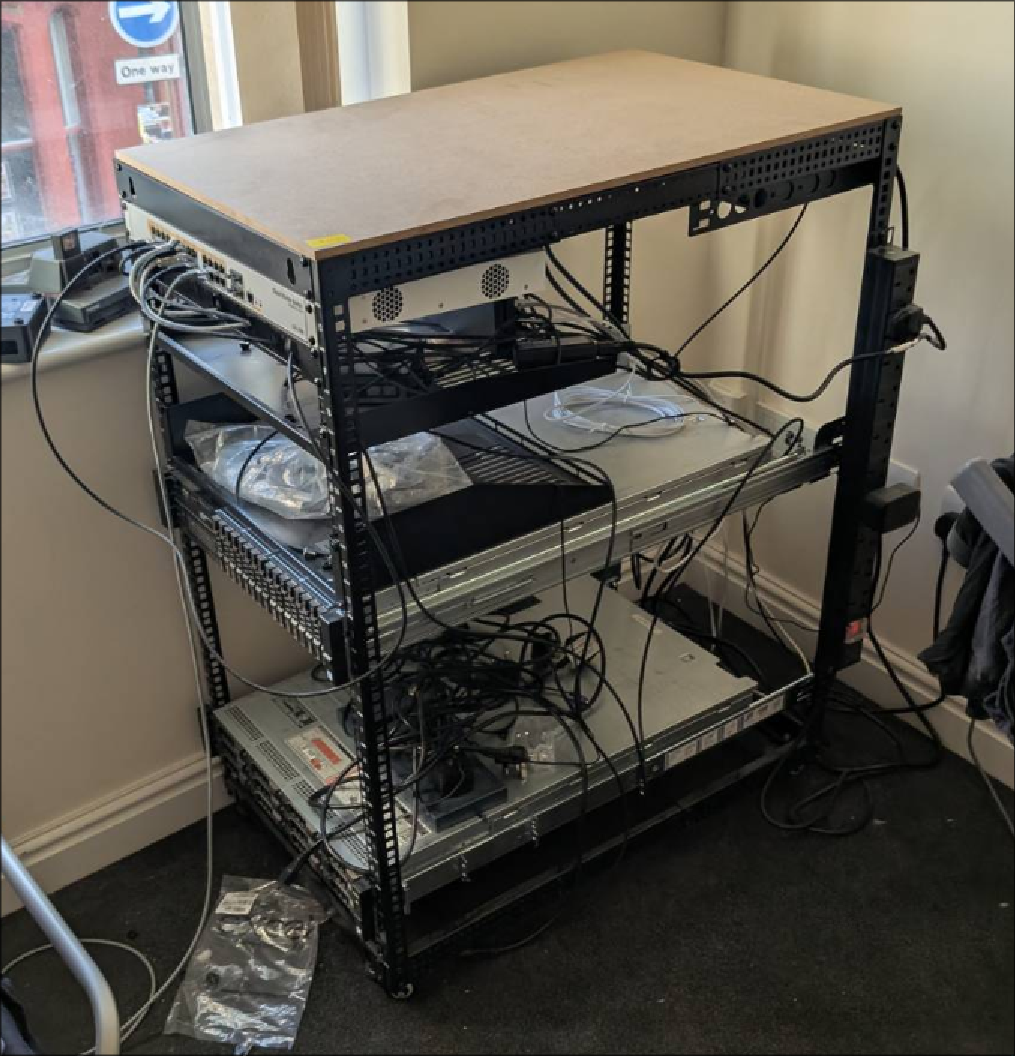
My rack is a bit of a mess of cables and is in a bit of an inconvenient spot. That image was captured at the start of the project, as you can see by the fact I have the MikroTik mounted at the top. Homelabs do not become C13 and STP hydras overnight, there is just the inalienable fact that “there is nothing more permanent than a temporary solution” that you need to deal with. Every temporary cable, rushed fix, and workable error “ill fix later” compounds. Slowly the corner of your flat stops looking like a homelab and begins to look like a timeline of bad decisions. How did I get here? When I first moved into my flat I was given freedoms I never had when I lived with my parents, and I capitalized on this by buying a server and a rack. The natural place to put this was close to the ISP demarcation port in my flat, which was in the corner by the window. As the rack has grown with the homelab it has gradually got messier and messier, and tidying it is something I am going to have to do during Project Blackwall or never. So the following decisions were made
- I will replace the PDU I hung off the side with an actual rackmount PDU on the back, which is downstream of my main Raritan PX3.
- I will move the rack into the other corner of the flat, running an RJ11 wire from the demarcation port to it - this frees up the corner by the window for a bookshelf and comfy chair for me to read.
- I am going to place a bit of wood on top of the rack, giving me a surface to put things on.
- I am going to try and cut down the cable monster I have created using cable ties and finding a home for unneeded ones.
I am fully aware the laws of entropy are not on my side, and realistically not a soul is going to care my rack is a mess… but I have to look at it, and I want to be proud of the thing that has consumed the majority of my time since its inception.
The steps
To pull this off, timing was important - this is not the sort of thing I can do in a weekend, it involved a lot of moving parts and swapping of infrastructure.
- Swap out my Switch - When I first moved into my flat I was given a small 8 port NetGear switch by a college. You ever seen that scene in Green Mile where John says “I’m tired boss”, well that is the life of this switch. When I got my TrueNAS server, over the course of 48 hours I made this poor bastard move over 12Tb of data. It was never designed to be the load bearing network junction I have used it as, and frankly I am amazed it held up as well as it did. Step 1 was always going to be to swap this out.
- Install OPNsense - Step 2 was going to be racking the new server and getting OPNsense on it, and configuring it to a point where I could swap my WAN connection when the time was ready
- Set up Modem and AP - Most ISP routers are not routers at all, they are effectively an entire networking cabinet crammed into a small form factor consumer friendly box. The reality of getting rid of yours is not just buying a new router, it is buying all of the individual items it replaces
- Swap out ISP Router - This in many ways should be as simple as moving a cable from one port to another… lol. I will also need to place the ISP router on an isolated VLAN on the new network so it continues to receive updates, the reason for this is because in most cases when you experience network issues the first thing your ISP will say is “can you please check if it still happens with our router”. The only issue is, if their router has sat in a box in a cupboard for nine months it will likely be so out of date their network won’t even let it connect. At this point I will still be using a flat
10.0.0.0/16network.
At this point I would have officially moved over to an OpenTik networking stack, and if I wasn’t insane I would stop here
- Bind9 Split Horizon DNS - For the longest time I have used
*.local.eddiequinn.casaas the domains for local services and this model has worked. Split-horizon DNS would intercept local requests for my global domain and route them directly to my internal reverse proxy, eliminating the inefficient need to bounce traffic out to the public internet and back. This by itself is reason enough, but it also will play an important part in deploying my IDP. During this process I am likely to also deprecate AdGuard, I will need to see how hard it is to natively implement adblock into Bind9. - Create
10.67.45.0/24and10.67.40.0/24- As seen in a previous section, these VLANs will be Management VLANs, serving the purpose of Network administration (switches, routers, APs, firewalls) and IT infrastructure & admin/management services. Long term they will have limited direct access to other VLANS. In the short term I will need to create a temporary cross-VLAN firewall rule in OPNsense, allowing bidirectional traffic between them and10.0.0.0/16. The goal of this is to ensure that legacy applications in the flat network can seamlessly communicate with the infrastructure services soon to be deployed in VLAN 40 and 45. - Deploy IDP to VLAN40 - Ill need to write and apply the deployment manifests for the dedicated Authentik VM, ensure the VM’s virtual network interface in Proxmox is correctly attached to the VLAN 40 bridge, and deploy the manifests. Once this is done it is just a matter of moving everything over to using Authentik, which I imagine will be neither funky nor fresh.
The Execution - A tale of Shielded Twisted Pairs and Moscow Mules
All of this happened over the course of late May and Early June - I do not wish to ruin the magic of this blog, but if you are under the impression I sat down and wrote all this up after the fact you are dearly mistaken. As I write this exact sentence I can only fully account for the MikroTik being installed. My point I am trying to make here is that this was messy, ongoing, and stressful… and I loved every second of it.
Step 1: The Green Mile Switch Retirement
eBay is fucking great, am I right? Only on eBay could I somehow nab an enterprise-grade switch for half the cost I was expecting, only for the shipping logistics to immediately descend into absolute anarchy. The seller had it delivered to “Post Office - Christie.” That was it. No street name, no shop name, and no further indication of its actual location. My small town has two Post Offices, so I ended up having to visit both of them, clinging to the blind hope that my new prized possession was sitting in a back room. I spent an hour watching the postal clerks wrestle with a system that apparently becomes a complete pain in the ass if you weren’t provided real tracking details, eventually leaving with a battered box with “Fragile” taped all over it.
The real comedy started when I finally got it home, plugged a console cable into it, and connected. Not only was this network switch completely unwiped by the seller… I realized I had accidentally inherited the entire infrastructure of a specific restaurant in London. I was sitting in my flat looking at their VLAN tags, their internal IP schemes, their firewall exceptions, and probably the network route that sent ticket orders to the kitchen printer for their starters. By some weird twist of fate, I had even been to this exact restaurant with some work friends a year prior. I did message them to let them know I ended up with this - I hope they have taken that on board and improved their IT asset disposal since.
I am truly thankful for the fact that these switches have a reset button on them - I am also amazed at this, because I really did not expect an enterprise switch to have a reset button on it. So I reset it, set an admin password, got the WAN port configured, got my PC configured, updated it…. and locked myself out. So two funny things about me locking myself out
- OpenClaw told me to take a backup and choose not to listen because “how much damage could an update possibly do” was a prevailing thought in my head
- The reason I locked myself out was because the native OS couldn’t cope with a password with special symbols in it - fun.
Remember kids, always put ,’s into your passwords, so you’ll mangle the CSV file that gets leaked when the company inevitably gets hacked.
So I reset it, set a simpler admin password, get the WAN port configured, got my PC configured, and I was up and running. I will freely admit I did not even bother to try and configure it using the GUI, commands are just easier to use. I slowly began removing ethernet cables from my poor-old-switch one by one and configuring them on the new MikroTik, and now John Coffey the Netgear switch has finally been decommissioned… at least until I need to put it through hell again for some other insane project in the future - all tech I own is condemned to a sick form of indentured servitude where I will run it till it dies, and then strip it for parts to use in other projects.
At the end of this step I have a managed switch, but it is still configured for the flat 10.0.0.0/16 subnet - We are now waiting for the OPNsense router.
Step 2: Hubris in the Face of Daemons
I want to start this section by saying that I have a real love-hate relationship with Dell
The Dell Rugged laptops are a perfect example of why. They are genuinely fantastic machines: sleek, built like absolute bricks, and capable of surviving conditions that would turn most consumer laptops into e-waste. Linus Tech Tips did a video on these once, and pulled out a picture of one of these laptops that survived a high powered rifle shot. The batteries are removable, hot-swappable, and across almost the entire rugged lineup the battery slots are physically identical. You slide one in, lock it, and boom.
The issue is that despite the slots being identical, the batteries themselves are not interchangeable. Put the wrong Dell battery into the wrong Dell laptop and the BIOS throws a tantrum. This, in many ways, perfectly summarizes Dell as a company. Their hardware engineers are clearly wizards, but somewhere in the corporate structure sits a man whose sole purpose in life is ensuring that every genuinely elegant design decision gets filtered by the razor-and-blades model that only serves to pad their bottom line. To add insult to injury they use the excuse “oh it’s to improve battery life” - Yes this may be the case, but that’s not why you did it. Techies are left in a position where we know dell are being predatory, dell knows we know they are being predatory, and we know dell knows that we know they are being predatory.
But holy shit do I feel a little chubb coming on whenever I install their tool-less rails. Dell are one of those companies where everybody knows exactly what the game is, and yet we all keep buying the hardware anyway because, frankly, the hardware fucks. My opinion on Dell isn’t a controversial one, and yet I get no flack off anyone for using second hand PowerEdge servers. Where morality meets reality you will find yourself in this weird position where you will put up with the fact that Dell suck because the second hand market gives you iDRAC, toolless rails, hotswappable power supplies, and more spare parts than you would ever need. I like ThinkPads for the same reason I like PowerEdges, because they are abundant, cheap, and easily serviceable.
It took me 30m to install the rails from the moment they arrived, and 20m of that was me putting off going downstairs to get them from my post room.
Of course this was just the rails, the server itself is a whole other story. Anyone who has read this blog for a while will remember the post I’m not dead, where I moved out of my parent’s house, relocated jobs, and attended the UK’s largest hacker camp all within one weekend. This was probably one of my more insane ideas, but it worked - the plan for the server was similar. The majority of the equipment for Project Blackwall arrived over the course of the last two weeks of May, with everything but the R330 and the Access Point having arrived by Wednesday the 28th. The server was being dropped off by the seller on the 29th between 17:00 and 18:00, and I had work the next day at 07:00. The plan was to rack it, install OPNsense, set up an SSO’d pangolin route so I can access it externally via a auth’d URL, and be in bed by 21:00 to wake up at 05:00. My AP would arrive on Sunday, and hopefully when I finish at 19:00 on Tuesday I could have some beers and get it switched over.
My god complex told me “everything would go according to plan”, my imposter syndrome told me “you are fucking mental”.
At this time the UK was experiencing a heatwave . My flat at the point looked like a bomb had been dropped on it because I had not done my weekly tidy as it was just too damn hot. Doing all of this while my flat feels like a literal sauna, with sweat dripping directly onto the top cover of my new (used) R330 as I try to blind-thread the chassis into the rails will be a great idea right? And I am sure adding a couple hundred extra watts of Dell-flavored thermal mass into a room that is already too hot will be fine… and im sure work will be nice and quiet, and will not follow the current pattern of avenging two to three P1 incidents per shift…
god im so fucked
Friday turned out to be yet another hot day, lucky not as hot as it has been but frankly a bit too hot for my liking. I got a text from the seller at around 17:45 that he was at the square of my town. England is a very strange country when it comes to heat - almost every single day of the year is miserable here, so when the weather is actually hot the entire population swarms the local pubs and begins to drink. I live in a small village, and there are four to five pubs all bordering a 2500 square foot square, and the entire square was covered by summered-out british people smoking, drinking, and enjoying the weather. Among this sea of sunburn was a clearly autistic teenager, his mother, and who I presume is his sister standing there with a server. You know that scene in “The Fifth Estate” where they drive all over Europe installing new servers? Walking through this herd of sunburnt locals, pockets full of SAS drives and an R330 was somehow my own version of that scene - It wasn’t performative, I was just a bloke picking up a server in front of 300 odd people, all staring at me as I walked off with this bit of kit. It was strange to say the least.
I walked into my flat, put the server on top of the rack, attached its rails, and slid it in thinking “this is going ok so far” - This brief moment of naivety was quickly overshadowed after plugging the PDU in and I found out this server does not have an iDRAC port.
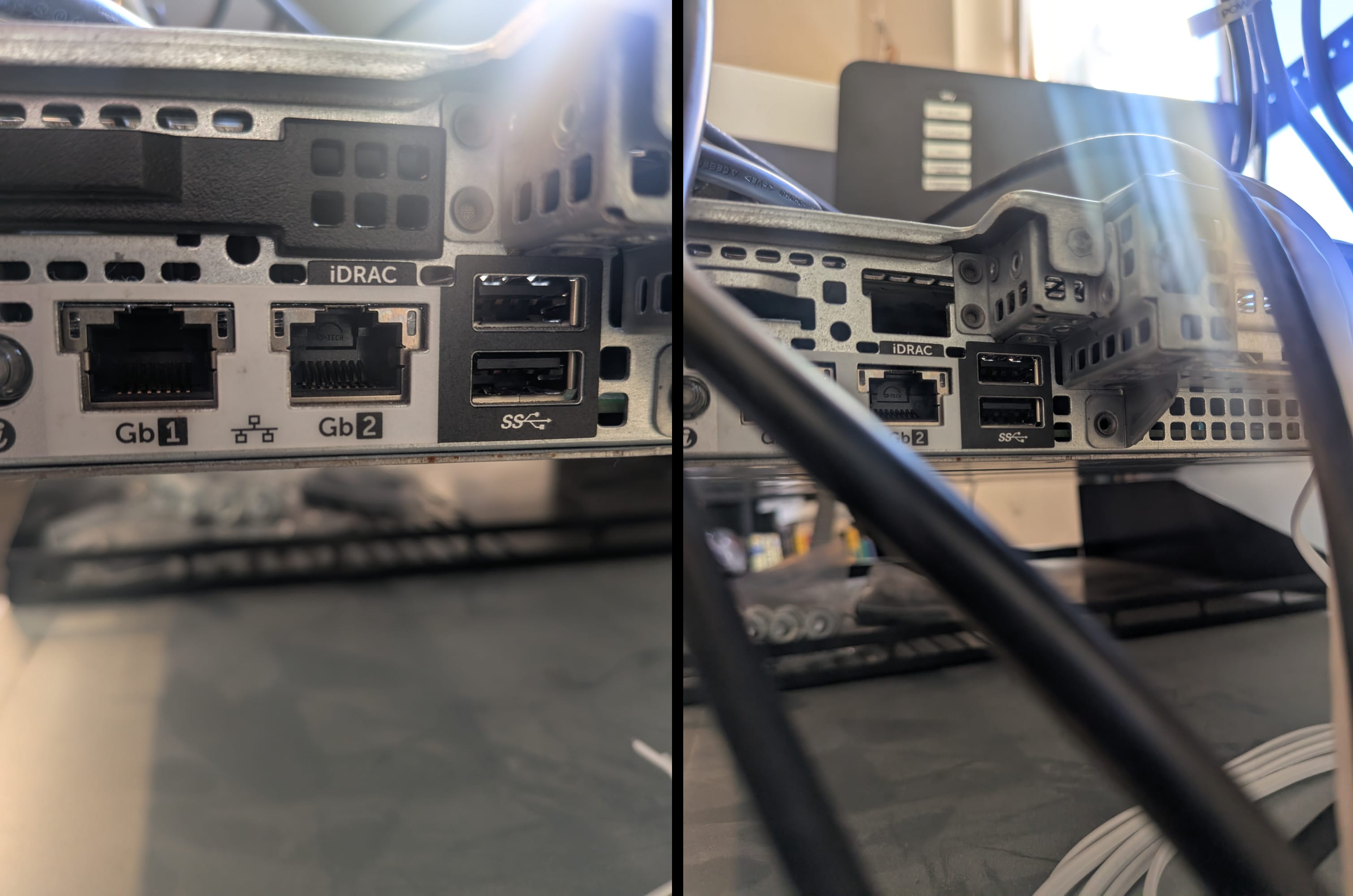
This one was not for me, the two servers I had bought previously had an iDRAC port, my friends server had an iDRAC port, the servers at work have an iDRAC port. It never at any point entered my mind this server would not have an iDRAC port - I expected maybe it wouldn’t have a license, and I was prepared for that, but the lack of port threw me. I consulted the Oracle at this point (AI), and it told me “maybe iDRAC was on one of the regular ports”, and so I plugged both in and had a look at DHCP. Nothing… I have a managed switch now… I need to actually configure the ports, it is not as simple as just “plug it in”.
/interface bridge port add bridge=bridge interface=ether3
/interface bridge port add bridge=bridge interface=ether4
Still no DHCP lease, so I pulled on my years of helpdesk experience and power cycled the server - two IPs now have DHCP leases, neither of which take me to the iDRAC login screen. I at this point checked the little screen on the front of the server and realized that iDRAC was statically assigned to an IP in 192.168.0.0/24, I changed this and wham bam, we had three distinct IPs coming from the server
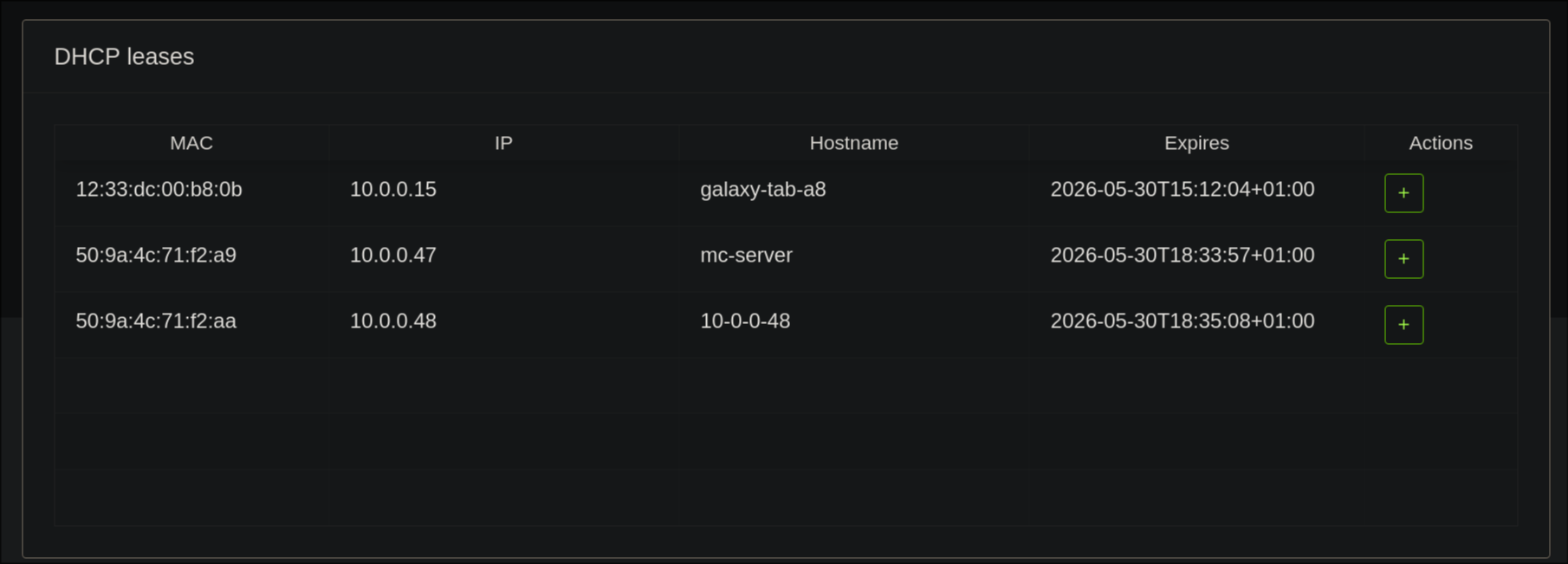
I think “cool, well its working - I will just look into getting a daughter board eventually”. I log into the portal using root / calvin and im hit with a “no license warning” when trying to use the console. Brilliant… It is now 18:54.
I did anticipate this might be something I deal with, and I wasn’t worried at the time - my logic was “surely someone has come up with a script to crack these things”. I still think this is likely the case, but I couldn’t find one. Instead I got a temporary license from this site just to bide me over. License was uploaded, it took successfully, I launch remote session… jnlp file. Fuck that. I change it to HTML5, try again.
im in
Because I knew time would be a bit of a crunch here, I prepared a Ventoy USB a few days prior with the OPNsense iso on it, plugged it in and booted.
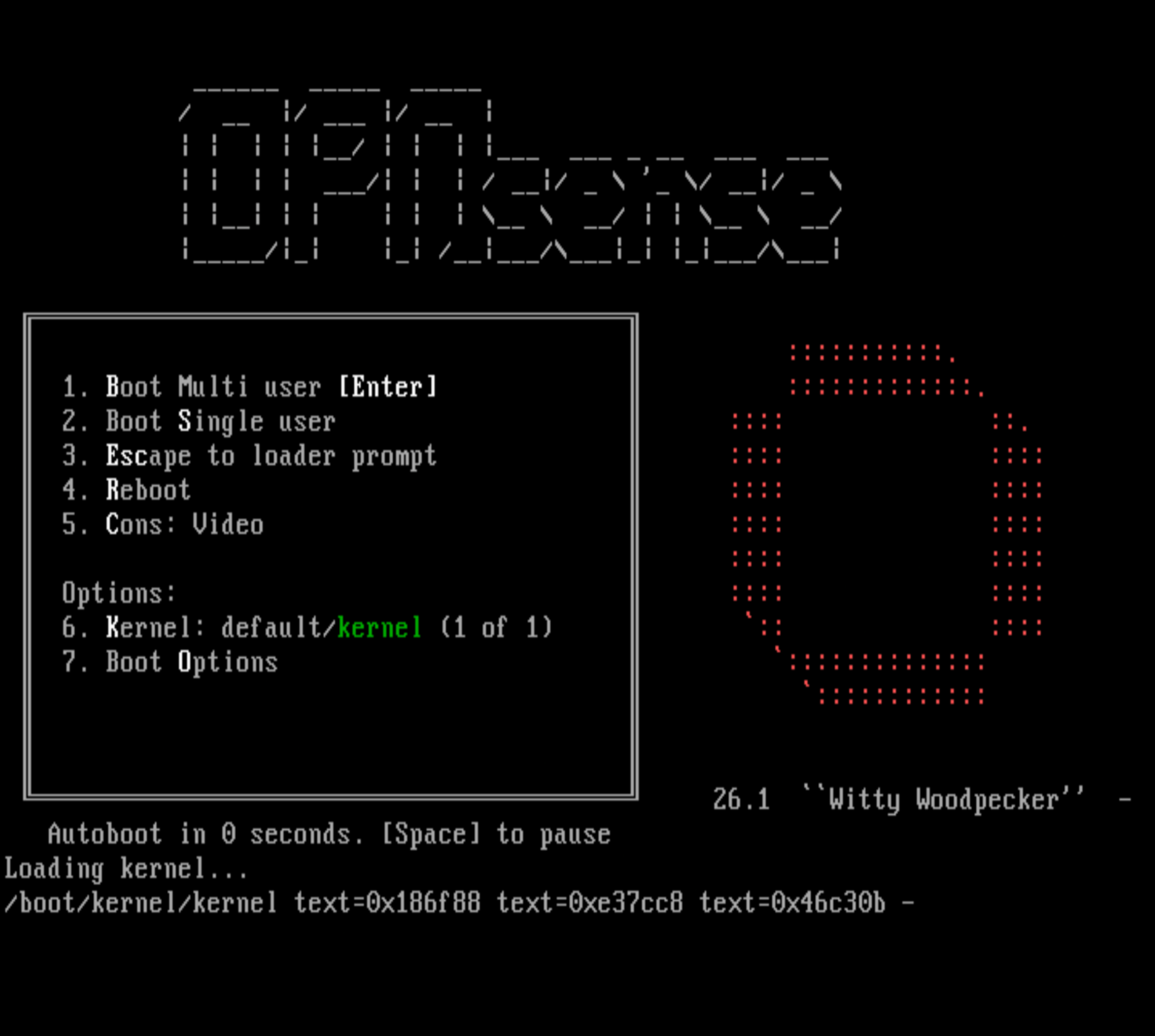
I thought the hard part was over at this point and it would be smooth sailing, this pipedream was quickly shutdown by RAID. After having a short argument with hermes-agent (I had switched from OpenClaw earlier on in the day) about using ZFS vs UFS, I landed on ZFS. I discovered that the disks were currently in hardware raid. I didn’t want to deal with software raid layered atop hardware raid, so I decided to change the drives to HBA mode.
I have not dealt with hardware raid on PowerEdges before - I haven’t had a real need for it. What followed was a nearly hour long process of “change this setting”, reboot, “change this setting”, reboot, “change this setting, “reboot”. In total it took seven reboots before I actually managed to figure it out. Every time I thought I had found the setting, I was met with yet another abstraction layer - Change the raid controller to HBA; remove the physical disks from the pool; change the disks so they are non raid; delve into yet another menu that seems to do EXACTLY the same thing as one I have already dealt with but is subtly different. In the process I learn a lot about iDRAC job queues and Hardware Raid. I fucking hate it 🙂 but in a “this was fucking frustrating but I think its cool” way, not how I hate UniFi which is morally and theologically justified. I installed it, got the web ui up, did some minor changes to the config so I could expose it, exposed it behind SSO and was in bed by 21:05, not too shabby.
I of course then laid awake until 4am anyway unable to sleep due to the combination of heat and excitement, but at the very least I know that my god complex is not a narcissistic delusion and I truly am just built different.
Step 3 - The Secret Handshake That Wasn’t
Compared to the previous section, the act of installing the AP and modem were actually quite tame.
I spent an afternoon a few days prior to the R330 arriving spinning up an omada controller docker container, and when the AP arrived setting it up was almost painless. It helped that I knew my way around Omada from deploying it in my parents house when they wanted their wifi upgraded. The most interesting part about this really is that my ISP router now doesn’t broadcast AP traffic at all.
The modem is a more interesting story - I went with a DrayTek Vigor 166, it was the most up to date modem that was compatible with my ISP’s ancient DSL connection, and they even provided a guide for exactly what I was doing
Sky Fibre Broadband & Now TV Setup Guide
Effectively, according to their documentation when a Sky router connects to Sky WAN and requests an IP, it sends DHCP option 61 along with a request to authenticate its access to Sky Fiber Broadband. You likely do not understand what I just said, and thats fine - I had no idea what DHCP option 61 was a week ago, and was happier for it. In essence it is a secret handshake. When your router connects to Sky’s network it doesn’t just ask for an IP address, it introduces itself. DHCP option 61 is the client identifier - a string that Sky’s network uses to decide whether to let you in or not. The format looks something like this:
MACaddress@skydsl|password
The fun part is that Sky, at some point, apparently stopped caring very much about whether this string is real or not. Several people online report that a completely fabricated string ( e.g.aabbcc123456@skydsl|abcd1234) works fine. The format matters more than the actual values. However I am me, and I was at least going to try and sniff or capture the credentials my ISP router was using.
The plan originally was to extract the real Option 61 string my Sky router was using rather than just making one up. The obvious approach would be Wireshark, except the DHCP handshake I needed to capture doesn’t happen on the LAN ports at all. It happens on the WAN side, between the Sky router and Sky’s network, traveling out the RJ11 port and down the DSL line. A laptop on the LAN port would capture the Sky router talking to my devices, not the Sky router authenticating with its ISP. I have a Plunderbug sitting on my desk which would have made ethernet capture trivially easy, unfortunately the Plunderbug does not speak RJ11.
So the plan became try the fabricated string first, and if Sky’s network laughs at me, figure it out from there. There is apparently a tool that can extract the credentials directly from certain Sky router admin interfaces, and failing that the Sky router’s admin page at 192.168.0.1 sometimes exposes WAN connection details if you know where to look. Unfortunately none of this could practically be done until I was ready to cutover from the ISP router to the OPNsense router, so these were just plans for the time being.
Step 4 - Men Will Literally Write Bash Scripts Instead of Unplugging a Cable
There is a phrase passed around gender politics, coined by Camille Paglia - It goes “There is no female Mozart because there is no female Jack the Ripper”. This effectively boils down to the idea that male biology has baked in a disproportionate drive for both extreme creation and destruction. It echoes the same verdict of “Men will literally deploy a kubernetes cluster rather than go to therapy”.
Following the saga that was actually installing OPNsense I showed up to work the next morning on a solitary hour of sleep, ready to mold this OS that I had midwife’d into existence the night before. I sat down at my desk and logged into my work laptop, checked my emails and confirmed the warehouse was in fact not on fire. After checking some tickets I accepted that at that exact moment in time everything was quiet enough for me to do some work on Project Blackwall. To a non IT worker, I want to pull back the curtain on the culture of IT offices here - When you walk in and it looks like we are just chatting shit and watching youtube, we are. IT is one of those jobs where if we are doing our job right it looks like we’re doing fuck all. I just wanted to clear this up in case someone is questioning why I was working on my home network in the office.
I logged onto OPNsense and decided to follow the wizard. It guided me through setting up a hostname, configuring my WAN interface, and configuring my LAN interface. I submitted the changes, and suddenly I was locked out.
For those of you that don’t know, the way pangolin (my remote access gateway) works is very similar to cloudflare tunnels. You basically place a VPN entrypoint in your network, and the pangolin server uses that to forward and server your internal services externally. In the old-net setup, my pangolin connection in my network was on 10.0.1.37/16, and I had just changed the IP of OPNsense to 10.67.40.1/24 - totally different subnets, and worlds apart as far as communication goes. I quietly accepted I was going to have to solve this when I was home, and so spent the rest of the day doing my actual job.
I arrived home at 19:30 - to reiterate, I was on a single hours sleep at this point. I pulled out my laptop, a shitty 3rd hand corebooted chromebook running NixOS, and an apple branded USB-A to ethernet adapter I found in the bottom of my bag. I configured the NIC I had just plugged in by running sudo ip addr add 10.67.40.2/24 dev enp0s20u3, opened librewolf, typed in https://10.67.40.1, Et voilà I was in… for about 45 seconds, and suddenly I couldn’t even ping it anymore.
Now I am assuming this was the ethernet adapter, but frankly the entire laptop adapter duo was cursed and something like this was bound to happen. Luckily it was easily fixed by unplugging and replugging the ethernet cable, however this would only fix it for an additional 45 seconds. “Men will literally deploy a kubernetes cluster rather than go to therapy” and apparently I will literally write an entire bash script to bounce a NIC on my laptop every 30 seconds, rather than unplugging/replugging in a cable in the same time frame. I don’t have the exact code I wrote in my sleep deprived state, but claude said this would work, and it looks awful similar to what I wrote so fuck it
#!/usr/bin/env bash
while true; do
    ip link set enp0s20u3 down
    sleep 1
    ip link set enp0s20u3 up
    sleep 30
done
This fix, while frustrating, did allow me to get into the web ui and add a virtual IP for the LAN interface in the flat 10.0.0.0/16 subnet. I then plugged back in the actual ethernet cable, confirmed the IP was working, updated the pangolin route, and then I woke up three hours later not quite knowing what point I got into bed. I was now ready to go back into work the next day and continue to do personal projects on the company dime, blogging about it in explicit detail, acutely aware the very words I write could lead to a dismissal.
I arrived to work the next day, bright eyed and bushy tailed, somehow still sleep deprived because I woke up at 02:00 in the morning and couldn’t get back to sleep. From the documentation I got directly from draytek themselves (there is a reason this is in italics, and my rage will be understood in a few paragraphs) I knew I had to set two things
- VLAN 101
- DHCP Option 61
A new VLAN interface vlan01 was created, parented to bge1 (the WAN physical port) with tag 101, and described as WAN-Sky. The WAN interface assignment was updated to use vlan01 rather than raw bge1. A DHCP Option 61 string was added to the WAN advanced configuration in the Send Options field - dhcp-client-identifier "aabbcc123456@skydsl|abcd1234". Realistically this was all I could really do while at work, so I once again spent the rest of the day doing my actual job, because it was Sunday and things were quiet for once. This mainly consisted of watching Jellyfin, playing ReadyOrNot, and helping my mate with his own projects
That evening, arriving home, the Vigor 166 was connected to the RJ11 on the wall, and the RJ45 P1 port was connected to OPNsense’s WAN port. The sky router was powered off. OPNsense picked up no WAN IP, once again confirming that theory that “anything that can go wrong will go wrong”. The vigors interface was reached by connecting a machine to its second ethernet port and setting a static IP in 192.168.2.0/24 to reach the admin page of 192.168.2.1. The page confirmed the modem was in Modem/Bridge mode by default, with VLAN 101 Service Tag already enabled and set to 101. In other words the modem was doing its job correctly, so I could rule that out as the cause. This did however mean that vlan01 never had to be set on the OPNsense WAN port, so it was assigned back to bge1, removing the vlan01 assignment entirely. It also turned out that Sky’s authentication is sufficiently relaxed at this point that no credential strings are required at all.
This was confirmed with a manual dhclient bge1 from the OPNsense shell
DHCPDISCOVER on bge1 to 255.255.255.255 port 67 interval 8
DHCPOFFER from REDACTED
DHCPREQUEST on bge1 to 255.255.255.255 port 67
DHCPACK from REDACTED
bound to REDACTED -- renewal in 1800 seconds.
In essence, most of the modem rhetoric that I established in step 3 was in fact false, and I have once again been scorned by the plight that is erroneous and deceitful documentation.
After a full reboot, OPNsense picked up the WAN IP automatically, and the virtual IP was changed from 10.0.0.200 to 10.0.0.1 so that devices on the Old-Net could use it as a gateway without any config changes. Now if I was smart, I would have got all of the port forwarding information from my previous router - you would think with how much I planned all this shit out I would have done that, but nae… the best-laid schemes o’ mice an’ men gang aft agley. Matrix federation port forwards were added (443 and 8448) to 10.0.4.2, and confirmed working externally via mobile data. A NAT hairpinning limitation was noted for internal access, but to be honest matrix should never have been exposed as a port forward to begin with, and will be transferred over to pangolin during the VLAN changeover (as gitlabs forwarded 2424 was in this process). I also had to lock down the OPNsense WebUI to LAN only after briefly being accessible from WAN interface following the port forward config.
I slept a full eight hours following this, and the following morning got to work and sipped my monster knowing that the physical work was over and pondering if the digital battlefield would be more forgiving than that of chassis and ports. To come was a split horizon DNS setup, a full VLAN landscape to summon into existence, and an IDP to manifest, each arguably large enough to be a project onto themselves. I remember the plight of my shitty little netgear switch, tired and fatigued praying just to be unplugged - I then of course remember every aspect of this was self inflicted and I in fact could stop whenever I want. Just like the ancient warriors who came before me I finished my monster and voided my bladder into the work toilet, knowing that sitting at my desk in an air conditioned office was totally equal in suffering to that felt at Alesia or Agincourt.
Step 5 - Caesar Also Had to Build His Walls Before He Could Man Them
Before we begin, a small warning. Up until this point Project Blackwall has largely been a story about heatwaves, sleep deprivation, poor life choices, and the consequences of allowing a man with a god complex to purchase enterprise networking equipment. This section is different.
Step 5 is where the project stops being primarily a chaos log and starts becoming a networking project. As a result, this chapter goes into considerably more technical depth than the rest of the post. This is partly because VLANs, trunks, and DHCP servers are difficult topics to explain without getting a little bit into the weeds, and partly because, for reasons that will soon become apparent, many of the opportunities for my usual brand of self-inflicted chaos were temporarily curtailed. That said, this section contains some of the most important lessons I learnt during the entire project. If you genuinely do not care about the technical implementation details, feel free to skip ahead to “A Midnight Networking Education”, where I finally stop blindly following instructions and begin understanding what I have actually built.
Initially the plan was to set up Bind9 first and then do the VLANs, I am totally unsure what the rationale was behind that. I think in my head I thought “I will set everything up on the flat 10.0.0.0/16 and then move everything over to VLANs”. In actuality just from brief run-ins with VLANs in the prior step it became immediately obvious it would be easier and make more strategic sense to do the VLANs first. Why did I not edit the plan to cover up this mistake I made?
“Locations change, the rationale, the objective. Yesterday’s enemies are today’s recruits. Train them to fight alongside you, and pray they don’t eventually decide to hate you for it, too. " - General Shepard, MW2
As was made clear in the previous step when I forgot to save my port forwards, the planning phase can give you an idea how to reach an objective but it cannot account for mistakes and asymmetric information. I am doing this project to get better at networking, and I planned it with the knowledge of someone who does not know networking that well. To be perfectly honest, it is amazing I have made it this far without having to swap a step. Now… back to the actual chaos rather than just meta commentary.
The VLAN architecture had been planned since the beginning of this project - eight distinct network enclaves, each with a specific purpose and trust boundary. Having the router in place meant I was able to actually stop blueprinting my walls and actually building them. I will freely admit, I have never done anything close to this before - I leaned on AI A LOT on this section, more so than I usually do.
OPNsense Config
The first thing I had to do was create the VLAN interfaces in OPNsense. Eight were created, all parented to bge0, each with their corresponding tag:
| Device | Tag | Description |
|---|---|---|
| vlan01 | 10 | Services |
| vlan02 | 20 | Storage |
| vlan03 | 30 | DMZ |
| vlan04 | 40 | Infrastructure |
| vlan05 | 45 | Management |
| vlan06 | 50 | Guest |
| vlan07 | 60 | Endpoints |
| vlan08 | 70 | IoT |
One thing that somewhat bothered me about this is that I couldn’t make the device name correspond to the tag, e.g. I would have liked tag 10 to be linked to the device vlan10. Unfortunately due to the FreeBSD VLAN naming convention this isn’t possible - This doesn’t make any difference functionally, it’s just not as tidy as I would have liked.
Each of these VLANs were then assigned as interfaces (done under Interfaces -> Assignments). They appeared as OPT1, OPT2 etc. Each interface was then enabled and given a static IP as its gateway address:
| Interface | Description | Subnet |
|---|---|---|
| OPT1 | Services | 10.67.10.1/24 |
| OPT2 | Storage | 10.67.20.1/24 |
| OPT3 | DMZ | 10.67.30.1/24 |
| OPT4 | Infrastructure | 10.67.40.1/24 |
| OPT5 | Management | 10.67.45.1/24 |
| OPT6 | Guest | 10.67.50.1/24 |
| OPT7 | Endpoints | 10.67.60.1/24 |
| OPT8 | IoT | 10.67.70.1/24 |
Doing this instantly caused a small problem. During the initial OPNsense wizard setup, the LAN interface had been given the 10.67.40.1/24 IP - The same address was now needed for the infrastructure VLAN gateway. The LAN interface IP was moved to 10.67.0.1/16, covering the entire 10.67.0.0/16 range without belonging to any individual subnet, freeing up 10.67.40.1 for its proper purpose. There is something that made me deeply uncomfortable about this configuration, and I want to address it directly. My view is that admin interfaces should only ever be exposed within VLAN 45 (Management) - that is the entire point of having a management enclave. Having the WebUI bound to bge0 at 10.67.0.1/16 feels like a violation of that principle. The honest answer is that it is, but it is an intentional and temporary one. bge0 is a trunk interface, not a network in the meaningful sense. It is the physical pipe that carries all VLAN traffic simultaneously. The IP on it exists purely so OPNsense has something to bind to during the migration, while VLAN 45 is still being populated with devices. Once a machine is on VLAN 45 and the management interface is confirmed accessible from there, the IP comes off bge0 entirely. The WebUI listen interface will be changed to OPT5 (VLAN 45), the 10.0.0.1 virtual IP gets removed, and bge0 becomes a silent trunk carrying tagged traffic with no IP of its own. So my discomfort was correct, however that state is just not the final state.
Following this crisis and deescalation, the next step was to configure DHCP via Kea DHCPv4. Eight subnets were added, each with the following config
- The pool 10.67.X.24-10.67.X.254, leaving the lower range free for static assignments
- global DNS pointing at AdGuard on 10.0.1.3 as a temporary upstream until Bind9 is deployed
Proxmox Config
On my proxmox host arasaka-1 a new VLAN aware linux bridge vmbr1 was created on eno3, which is currently an unused physical NIC. The decision to use a single VLAN-aware bridge rather than eight separate bridges keeps things clean: VLAN tags are assigned at the VM NIC level rather than requiring a dedicated bridge per network. Critically, this was placed on eno3 rather than the existing eno2 interface to avoid disrupting any currently running VMs during the migration.
The MikroTik Trunk Configuration
The next step was configuring the actual switch and this was the thing I could not do at work. I knew if I fucked it up I would be locked out, so I would need to do where I could jack into the switch directly as a break glass access method. I had two methods I could use:
- Use a console cable directly connected to the switch (the sane method)
- Place a device on the
10.67.40.0/24VLAN so I can still access the switch interface
In fairness, the second one was theoretically possible but in many ways I was playing with fire if I chose this method to begin with. If I did not configure the device connection properly I would be locked out, and at that point my network would be unusable without a console cable. I would also realistically need to use the NixOS chromebook abomination that caused issues in previous steps, which added further potential issues to this equation. So why did I even consider this option? I had stupidly given away my only console cable to my friend who was just starting his homelab a couple of weeks prior, completely oblivious that maybe I shouldn’t have done that before a massive networking project. I ordered a new one and it was due to arrive the next day.
I was at this point stuck between a rock and a hard place, unsure whether to do something that realistically would be fine but could fully lock me out or play it safe and wait for a cable to arrive. My exact view on this at the time was “In the worst case here, I have more chaos to talk about in the blog post”. I tested an alternative ethernet adapter at work and it didn’t shit itself within 45 seconds. When I got home I was going to connect my laptop to a port, ping 1.1.1.1, go for a piss, and if there was no issues with the pings by the time I got back then I am taking that as an all clear - This test passed. We were going in.
The first step was to take a full config backup prior
/export file=backup-before-vlans
After this was mapping the physical port layout - running a combination of /ip neighbor print and /interface bridge host print where !local confirmed the following:
| interface | device |
|---|---|
| ether1 | spider (laptop) |
| ether4 | blackwall-1 (OPNsense) |
| ether5 | petrochem-pdu-1 (PDU) |
| ether7 | bartmos-ap-1 (AP) |
| ether10 | arasaka-1 (Proxmox) + all VMs via eno2 |
| ether11 | datafortress-1 (TrueNAS) |
| ether15 | proxmox-bkup (Proxmox Backup Server) |
| ether17 | blackhand (desktop) |
A cable was run from proxmox’s eno3 into ether13, confirmed with a running link flag. This would become the VLAN trunk for the new VLAN-aware bridge vmbr1.
Eight VLAN entries were added to the MikroTik bridge - all of these were additive only, and would not have a meaningful effect until VLAN filtering is enabled:
/interface bridge vlan add bridge=bridge tagged=ether4,ether13 vlan-ids=10
/interface bridge vlan add bridge=bridge tagged=ether4,ether13 vlan-ids=20
/interface bridge vlan add bridge=bridge tagged=ether4,ether13 vlan-ids=30
/interface bridge vlan add bridge=bridge tagged=ether4,ether13 vlan-ids=40
/interface bridge vlan add bridge=bridge tagged=ether4,ether13 vlan-ids=45
/interface bridge vlan add bridge=bridge tagged=ether4,ether7,ether13 vlan-ids=50
/interface bridge vlan add bridge=bridge tagged=ether4,ether7,ether13 vlan-ids=60
/interface bridge vlan add bridge=bridge tagged=ether4,ether7,ether13 vlan-ids=70
The bridge itself was then added as a tagged member of VLAN 45 - The management lifeline that ensures the MikroTik retains its own management access after filtering is enabled:
/interface bridge vlan set [find vlan-ids=45] tagged=ether4,ether13,bridge
A VLAN interface and management IP were created on the MikroTik:
/interface vlan add interface=bridge name=vlan45-mgmt vlan-id=45
/ip address add address=10.67.45.2/24 interface=vlan45-mgmt
The laptop’s port (ether1) was configured as an untagged VLAN 45 access port - the fallback management path if everything went wrong:
/interface bridge port set [find interface=ether1] pvid=45
/interface bridge vlan set [find vlan-ids=45] untagged=ether1
And finally on the laptop I ran the following to give it a 10.67.45.0/24 address
sudo ip addr flush dev enp0s20u3
sudo ip addr add 10.67.45.10/24 dev enp0s20u3
sudo ip route add default via 10.67.45.1
At this point I was officially at the point of no return - it was also at this point that anthropic was dealing with a major incident, and now was not the time to test my networking troubleshooting without the assistance of an LLM. Given this I went to sleep. In my usual fashion I then woke up a few hours later at 02:00 and couldn’t get back to sleep, and so I decided now was the time to turn on VLAN filtering
/interface bridge set bridge vlan-filtering=yes
The desktop stayed online. All VLAN gateways responded. Internet confirmed. The Blackwall was live.
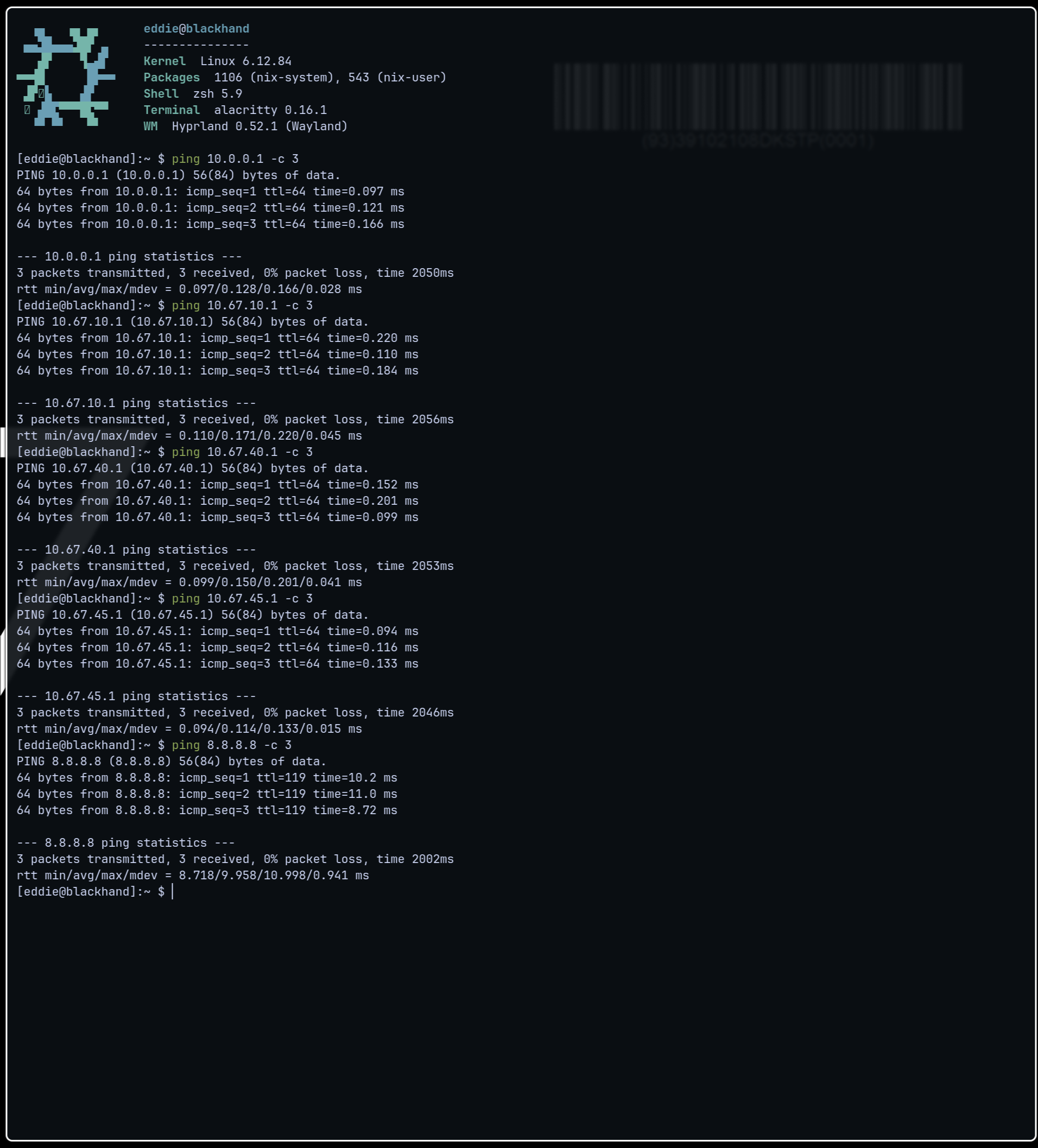
Validating the full stack
A test Ubuntu VM (opentik-test-1, VMID 201) was spun up on Proxmox attached to vmbr1 with VLAN tag 40. It did not initially get a DHCP lease. Troubleshooting shed light on three distinct issues
First, ether13 had not been added to the bridge as a port member - the VLAN entries existed but the port wasn’t carrying any traffic. This was fixed with /interface bridge port add bridge=bridge interface=ether13.
Second, Kea DHCPv4 was failing to start because dnsmasq was already bound to port 67 across all interfaces, blocking Kea from binding. Dnsmasq was disabled entirely - AdGuard handled DNS currently, and Bind9 would take over in future; Kea was handling DHCP - dnsmasq was serving neither purpose in the plan.
Third, with dnsmasq cleared, Kea started successfully but the VM still couldn’t be reached because OPNsense blocks all traffic on new interfaces by default. A temporary allow-all rule was added to the Infrastructure interface (OPT4), the ping responded, and the rule was deleted.
Final confirmation: the VM received 10.67.40.24 from Kea, the gateway 10.67.40.1 responded to pings, and the full path from VM → Proxmox → ether13 → MikroTik → ether4 → OPNsense → VLAN 40 was confirmed end to end. The walls are built.
A midnight networking education
It was at this point, sitting at my desk at 2am with a test VM finally talking to OPNsense, that I realised that I had largely let Hermes-Agent take the wheel on the MikroTik config without fully understanding what I had just done. I sat there and pondered, realising that all I really had done was deploy a ubiquiti network with extra steps, and I needed to understand what I had just done for any of this to be worth it. What followed was probably the only useful networking conversation I have ever had.
The mental model that finally made everything click was thinking about my network as a medieval city. Each VLAN is a district, and the MikroTik is the road network connecting them.
- Tagged Ports are motorway on/off ramps - they connect multiple districts simultaneously, and every hauling cart (frame) traveling on it carries a label (the VLAN tag) saying which district it came from and where it is going. OPNsense and Proxmox are on tagged ports because they need to send and receive traffic for every district at once.
- Untagged ports are domestic streets inside a single district. Your laptop doesn’t know or care about other VLANs, it just lives in VLAN 45 and sends normal untagged frames. The switch handles the labelling invisibly, tagging frames on the way in and stripping tags on the way out.
- The VLAN table is the map of all roads and which district they connect to.
- VLAN filtering is the moment road blocks go up - frames without valid labels get turned back at the junction.
- The OPNsense firewall is the customs official at the border crossing between districts. Every lorry crossing from one district to another passes through OPNsense, which checks the manifest and decides whether it’s allowed through. Lorries travelling within a district never see customs at all.
The important realization however is this - The switch manages the walls, the firewall manages the gates in those walls. This challenged assumptions which I had about network security prior to this point. I had assumed very much that switches had all of this config dictated to them entirely by the firewall, when in actuality they both work together. This also did something else important.
When I first started in helpdesk I got my CompTIA A+ very quickly, and following that decided to work on getting my Network+. The thing about me is I do not learn by being dictated information, I learn by doing. I passed my A+ quickly because I already knew most of the information already, I was struggling with Network+ because to someone who has only ever dealt with unmanaged switches VLANs, SDNs and firewalls mean nothing to me. I had no idea what purpose they served contextually, and more importantly I had no idea what problem they were trying to solve. Now I have built a highly segmented network I understand why enterprise networks are built the way they are and what problems an SDN is trying to solve.
I had configured a single switch - now what do I do when I need to add my second core switch? How do I port my config from one to another? There are three main answers
- Do it by hand again - This is going to be error prone, slow, and lends itself to long term state drift between the two switches
- Utilize tools like OPNsense and Terraform to do it - Ansible and Terraform are automation tools that manage a decentralized group of devices. They basically automate the previous method, just at scale - You cut out the error prone nature and speed issues, however you are still dealing with potential state drift due to the control plane of these devices still being decentralized.
- Software Defined Networking (SDN) - This is a fundamentally different architecture, where the switches become dumb forwarding devices with no independent intelligence. A centralized controller holds all the network logic and tells each switch what to do in real time. Drift becomes impossible because there is no local config to drift from. The downside is the controller becomes a critical dependency that has to be engineered for high availability.
The practical upshot for Blackwall long term is: Ansible for network IaC now, NetBox as a network source of truth during the Argus phase, and OpenDaylight as a potential SDN controller sometime after that. Whether the last one ever actually happens remains to be seen - but then again, nothing about this project has ever been justified by the size of my network.
It was 2am. The walls were built, and now I need to move everything into them.
Twelve hours of actual work, if we forget troubleshooting and crashouts
This is actually the second time I have sat down and written this section. The first attempt was just a bit too dry, and a bit too technical. Realistically I know what I did, and I really do not think anyone with enough patience to read this far into this post wants to know about me adding virtual NICs, managing DHCP reservations, and updating Traefik entries. The fact is what I had to do was very simple in theory, in practice this entire section spiked my cortisol something fierce.
The theory: add a second network card to each VM, get it an IP on the correct VLAN, make a reservation so it keeps that IP, update the config files that reference the old IP. Repeat twenty-odd times. Straightforward. The practice: a masterclass in how many assumptions a network can silently accumulate over years of “I’ll fix that properly later.”
I channeled my inner District 9 character and started serving eviction notices. Infrastructure first - infstack-1 where Pangolin lives, then AdGuard, then everything else. The order mattered because losing remote access mid-migration would have ended the session immediately and I was doing this over several evenings from work. The LXCs went smoothly. The VMs were slightly less smooth - Ubuntu’s cloud-init decided the new network interface was called ens19 instead of eth1, which took an embarrassing amount of time to figure out. The k3s cluster got decommissioned entirely rather than migrated, partly because nothing was running on it and partly because I needed a win.
Then I tried to move the physical devices.
Moving the desktop to VLAN 60 was when I discovered the first of the three things that would haunt the rest of this migration. I had no internet. I could ping 1.1.1.1 so the routing was working. I could not ping google.com so DNS was broken. I went through the OSI model layer by layer like someone who has actually been studying for their Network+ and eventually landed on the answer: AdGuard, my DNS server, was configured to listen on 10.0.1.3 (its old IP) and had no idea that it now had a second network card with a completely different address on a completely different network. It was answering the old phone number and I was calling the new one. The fix was one line in a config file. The diagnosis took an hour. This pattern repeated itself across the entire migration. Every service that had been told “listen on this specific IP” broke the moment it got a second IP on a different network. The lesson is check every service’s bind address before and after migration, and this is now so deeply embedded in my brain that I will be checking bind addresses in my sleep for the next decade.
The second recurring theme was default gateways. Every device that received a new DHCP lease on a new VLAN got an IP. What it did not get, initially, was a default gateway. This produced a deeply confusing symptom: OPNsense could reach the device fine, but the device could not reach anything outside its own subnet. Imagine calling someone, and they know you have called them, but the moment they try and respond their phone says “this number does not exist”. It turned out Kea’s automatic gateway option was not actually being sent with leases, requiring me to manually configure a routers option for every single subnet. This is the kind of thing that should be a five-second checkbox and instead cost me several hours of confused debugging across multiple sessions.
The third theme was NFS volumes. Everything that was mounting storage from TrueNAS had the old TrueNAS IP hardcoded into the volume definition. GitLab, Immich, the entire arr stack, the backup service - every single one of them needed to be stopped, have its volume deleted, have the volume recreated pointing at the new IP, and then restarted. GitLab made this especially entertaining by refusing to stop gracefully, requiring increasingly aggressive measures to convince Docker that yes, the container should in fact stop. There is something to be said here that I ideally should use domain names for this sort of thing so at least I have a layer of abstraction protecting me in future - Thank god I am going to implement Bind9.
The AP and the MikroTik had their own saga which I will summarize as follows: I tried to be clever, I lost access to both simultaneously, I ordered a console cable and a PoE injector, they arrived the next day, I fixed it. The AP now lives on VLAN 40 rather than VLAN 45 where it architecturally belongs, and this is the kind of pragmatic compromise that accumulates in every real infrastructure project. It works. It will be fixed properly later. The SSIDs are broadcasting, my phone pulled an IP from the correct subnet, wireless VLAN segmentation is confirmed working.
Proxmox management ended up on a VLAN-tagged virtual interface riding on top of the existing trunk cable, after the dedicated physical port turned out to be dead. The old bridge was decommissioned. The old network became a ghost - technically still alive as a virtual IP on OPNsense, practically speaking already dead with only stale ARP entries where services used to live.
The migration took the better part of a week of evenings, one of which ended with me genuinely losing network access to my own switch and having to order hardware to get back in. All items are back up aside from Proxmox Backup Server, but this is in the post. To close the loop on the DNS problem that split-horizon was always supposed to solve, Bind9 was deployed on infstack-1, a wildcard zone was created for local.eddiequinn.casa pointing everything at Traefik, and Unbound was updated to forward internal domain queries to Bind9. anything.local.eddiequinn.casa now resolves to 10.67.40.25 from inside the network. The hairpinning problem that has existed since I first started this project is still present, but will be purged next step.
There is probably a long mentor to mentee talk I can give here about perseverance, working through problems, and never giving up - I will be honest if it wasn’t for nicotine and beer I think that server would have gone out the window five or six times. I am not a role model and please do not emulate my actions. I’m tired, see you next step.
Step 6 - Scary Nameservers and Nice Zone Files
“Eddie just use AdGuard and be done with this, why are you using bind”
You, it is exactly you that I am griping against here - No, I will not “run AdGuard”. Here is the thing right, AdGuard as a program is pretty good, it builds really well on the foundations that were popularized in homelabs by PiHole, but other than the phrase “DNS Sinkhole” I have no idea how it works. I know that if a request comes in, and it matches a certain criteria, it is resolved to 0.0.0.0, but I do not know what that criteria is. This alone is a pretty good reason for me to delve into running an actual nameserver, but there is also split horizon and long term planning. The fact is the *.local.eddiequinn.casa has served me well, but im starting to get ever so slightly pissed off with having to deal with the latency of the global gitlab.eddiequinn.casa within my LAN - Sending a packet out just to go back in is stupid, and was now broken due to the NAT hairpinning issue anyway. Long term planning is a more interesting reason. My goal with my homelab has always been to have it be entirely declarative, and realistically to do that I needed a plaintext driven nameserver, which bind is. I will not lie, Christian Lempa’s video played a large part in this decision also, but mine and his goals for our homelabs are very similar (i am aware of the parasocial aspect of me saying me and him as if we know each other).
Before I get into the full plan, some context - Bind9 did not wait until Step 6 to make its first appearance. During the migration AdGuard decided to stop starting entirely, I am unsure why but it is probably something to do with a port binding issue. I had neither the patience nor the inclination to debug given I was planning to replace it within a few days anyway. I was faced with a choice: spend an hour fixing a service I was about to decommission, or just deploy the thing that was going to replace it and call it done. I deployed Bind9. A single wildcard A record pointing everything at Traefik, Unbound forwarding internal domain queries to Bind9, fifteen minutes of work.
Effectively, it was just this, an options file, and files pointing at files.
$TTL 300
@   IN  SOA ns1.local.eddiequinn.casa. admin.local.eddiequinn.casa. (
        2026060501 ; serial
        3600       ; refresh
        1800       ; retry
        604800     ; expire
        300 )      ; minimum TTL

@       IN  NS  ns1.local.eddiequinn.casa.
ns1     IN  A   10.67.40.25
@       IN  A   10.67.40.25
*       IN  A   10.67.40.25
It was scrappy, it was not the architecture I had planned, and it solved the immediate problem. What follows in this step is taking that MVP and building it into something I am actually proud of.
My only concern for this move was that I might lose adblock functionality, at least an easy adblock functionality… this really is not the case however. RPZ (Response Policy Zones) is BIND9’s answer to the question “how do I block ads and malware at the DNS level without running a separate tool”. Before BIND resolves a query, it checks it against a special zone file. If the domain matches an entry in that zone, BIND returns whatever the zone says - in my case this will be 0.0.0.0 or NXDOMAIN, which is DNS for “this doesn’t exist, go away”. If it doesn’t match, the query gets resolved normally and the client is none the wiser. This is exactly what AdGuard and PiHole do. The difference is AdGuard wraps it in a web UI, a database, and a dashboard with pretty graphs. BIND puts it in a text file. I know which one I prefer.
The practical implementation is straightforward. Blocklists are distributed in RPZ format by several well-maintained projects, OISD and Hagezi are the two I plan to use, both of which publish zone files covering millions of known ad, tracking, and malware domains. BIND fetches these automatically via zone transfer and keeps them up to date without any manual intervention. When a domain gets added to the blocklist it propagates to my resolver on the next refresh. When I want to whitelist something I add an override record to a local RPZ zone. When I want to add a custom block I add a record to the same file. All of it lives in the same GitLab repo as the rest of my infrastructure config. All of it is version controlled. All of it is declarative. This is the entirety of what AdGuard was doing, expressed in about fifteen lines of plaintext. The long term DNS architecture that this enables is the real prize though, and that deserves its own explanation.
The Plan
I want to be upfront about something. What I am about to describe is, by any reasonable measure, more complex than it needs to be for a one-person homelab in a one-bedroom flat. I am aware of this. I am doing it anyway, and I want to explain why.
The current state, a wildcard *.local.eddiequinn.casa pointing everything at Traefik, works. It is functional, it is simple, and it would continue working indefinitely if I left it alone. The problem is it tells me nothing. When I see gitlab.local.eddiequinn.casa I know it is GitLab and I know it is internal, but I do not know what VLAN it is on, what tier of the infrastructure it belongs to, or how it relates to the physical hardware running it. As the homelab grows that flat naming scheme becomes a liability. Everything is equally important, equally located, equally opaque. What I want instead is a DNS namespace that mirrors the actual architecture. A name should tell you what something is, where it lives, and how it relates to everything else. This is not a novel idea, it is how enterprise networks have been named for decades, but it requires actually designing the namespace rather than letting it accumulate organically.
The design has four layers.
The authoritative tier The actual IP addresses, one record per interface. This tier is split cleanly into internal functional services, physical hardware assets, virtual machines, and standalone cluster endpoints.
The functional subdomains tell you exactly what kind of thing a service is and which VLAN it lives on: svc for VLAN 10 services, infra for VLAN 40 infrastructure, and mgmt for VLAN 45 management interfaces.
grafana.infra.local.eddiequinn.casapoints at10.67.40.27proxmox.mgmt.local.eddiequinn.casapoints at10.67.45.27
Physical hardware gets its own identity tied to a geographic site under the svr subdomain. The bartmos in the server names is the site identifier - bartmos is my flat, named after Rache Bartmoss, the legendary netrunner whose posthumous virus took down the old Net. Fitting, given I just killed my own old network. Physical infrastructure lives here:
arasaka-1.bartmos.svr.local.eddiequinn.casais the physical server node interface.idrac.arasaka-1.bartmos.svr.local.eddiequinn.casapoints to the physical machine’s iDRAC IP.gridlink-1.bartmos.infra.local.eddiequinn.casapoints to the physical core switch.
To handle clustering and virtualization without breaking abstraction, the network isolates collective cluster entities into clstr.local.eddiequinn.casa, while individual virtual machines live under vrt.local.eddiequinn.casa.
To future-proof the network, even single-node hypervisors are treated as a cluster pool. Currently, arasaka-1 is the sole physical node inside a logical Proxmox cluster named arasaka. They will be prefixed with bm if it refers to a physical cluster e.g. a proxmox cluster, or vrt if it is a virtual cluster e.g. a Kubernetes cluster made up of VMs.
Records within clstr refer strictly to a cluster itself, not the individual items running inside it:
arasaka.bm.clstr.local.eddiequinn.casarepresents the multi-node Proxmox cluster entity (e.g., a shared management VIP).netwatch.vrt.clstr.local.eddiequinn.casarepresents a nested Kubernetes (k3s) cluster entity (e.g., the collective control plane API load balancer).
Individual virtual machines live in the vrt tier, identifying the specific guest OS instance and the compute cluster hosting it:
infstack-1.arasaka.bm.clstr.local.eddiequinn.casais a single, distinct VM instance running on the Arasaka compute pool.
These infrastructure names are the backbone talking to itself. Functional service names are mapped via CNAME records to these stable infrastructure targets. If a virtual machine migrates to another physical node within the cluster, or if a physical host is swapped entirely, the underlying identity remains stable and the application routing remains unbroken.
This is the difference between a naming scheme that was designed and a naming scheme that accumulated. The *.local.eddiequinn.casa wildcard accumulated. This was designed.
human-readable canonical names
gitlab.eddiequinn.casajellyfin.eddiequinn.casaproxmox.eddiequinn.casa
These are the names people actually type. Internally they are CNAMEs pointing into the authoritative tier under local.eddiequinn.casa. Externally Cloudflare resolves them to Pangolin. The same name works everywhere, and the split-horizon mechanism handles routing it correctly based on where the query comes from.
This is the split-horizon part. Bind9 holds an internal view of eddiequinn.casa with the canonical records, and is authoritative for local.eddiequinn.casa entirely. Unbound on OPNsense forwards queries from internal clients to Bind9. External clients use Cloudflare’s public view which only knows gitlab.eddiequinn.casa → PANGOLIN_IP. The two views never conflict because they are served to different audiences - Bind9 only answers queries from 10.67.0.0/16. The result is that gitlab.eddiequinn.casa resolves to 10.67.10.31 from inside the network and PANGOLIN_IP from outside it, without any client configuration, split DNS client software, or hairpinning. The packet goes where it should go based purely on where the query originated.
explicit override subdomains
gitlab.local.eddiequinn.casafor when you want to force internal resolutiongitlab.global.eddiequinn.casafor when you want to force external.
These are optional convenience records, not the primary way anything works. I will add them as needed rather than creating them for every service up front. The distinction matters: gitlab.local.eddiequinn.casa lives in the local.eddiequinn.casa zone and is unresolvable outside the network by design. gitlab.global.eddiequinn.casa lives in the public eddiequinn.casa zone and always resolves to Pangolin regardless of where the query comes from.
Traefik impact
This is actually a simplification rather than a complication. Right now every Traefik router rule looks like this:
rule: "Host(`gitlab.local.eddiequinn.casa`) || Host(`gitlab.eddiequinn.casa`)"
Once split-horizon is in place, both internal and external traffic arrives at Traefik using gitlab.eddiequinn.casa. The local variant disappears from Traefik config entirely:
rule: "Host(`gitlab.eddiequinn.casa`)"
Half the routing rules, identical behavior.
Execution (and why I dislike AdGuard even more now)
Honestly, when I compare it to the migration from step 5, bind was a breath of fresh air. It runs as a Docker container on infstack-1, config and deployment files being pulled from GitLab. The MVP wildcard zone from the migration was replaced with the full tiered zone files described above, a second zone was added for eddiequinn.casa to handle the canonical names and split-horizon, and Unbound on OPNsense was pointed at Bind9 via a domain override. The whole thing took an afternoon, and I will be perfectly honest the vast majority of it was done half-cut.
The interesting part was the debugging. The eddiequinn.casa zone initially refused to load because I had declared ns1.local.eddiequinn.casa as the nameserver. This was fine syntactically, but BIND couldn’t find an address record for it within the eddiequinn.casa zone itself, and threw a fit. The fix was changing the SOA and NS to ns1.eddiequinn.casa and adding an A record for it in the same zone. Minor, annoying, and the kind of thing you only learn by doing.
The CNAME chain depth was another moment of mild concern, but in reality it just worked fine.
gitlab.eddiequinn.casa → traefik.infra.local.eddiequinn.casa → infstack-1.arasaka.bm.clstr.local.eddiequinn.casa → 10.67.40.25 is three hops.
BIND resolves the full chain internally and returns the final A record, so clients see a single answer and never need to chase the chain themselves. It works cleanly and the chain is readable - follow it and you understand exactly where the traffic ends up and why.
The split-horizon worked first time, which I was not expecting. gitlab.eddiequinn.casa resolves to 10.67.40.25 from inside the network and to PANGOLIN_IP from outside it, without any configuration on the client side. The hairpinning problem that has existed since I first started Blackwall is gone. Internal traffic stays internal. It is a deeply satisfying thing to watch work.
To be perfectly honest, the only issue I did encounter was the RPZ ad blocking. My intention was to pull OISD and Hagezi blocklists via zone transfer, the way a proper secondary nameserver would. It turned out that neither OISD nor Hagezi actually support AXFR - they distribute their RPZ files as HTTP downloads rather than via DNS zone transfer. I spent an embarrassing amount of time debugging connection timeouts before reading the documentation properly and discovering this. The infrastructure is in place…
- The response-policy directive is in
named.conf.options rpz.localis live for custom rules
But the automated blocklist ingestion needs a download script and a cron job rather than native zone transfer. This is in the backlog. My browser runs uBlock Origin and to be honest, I just want to bring this project home now.
The zone files themselves are the thing I am most pleased with. They live in GitLab, they are plaintext, they are declarative, and they are version controlled. When I add a new VM I add a record. When I move a service to a different host I update a CNAME. When I fix the RPZs, when I want to block a domain I will add a line to rpz.local.zone and push. The entire DNS state of the network is expressed in three files that any competent sysadmin could read and understand without documentation.
To be brutally honest, prior to this entire thing I thought “I think AdGuard is a bit cringe but it serves a purpose”. I now just kind of view it the same way I do Manjaro Linux - just use Arch. At best AdGuard is a stepping stone to understanding what DNS actually is and what it can do. The abstraction is the product, the dashboard exists because the underlying config is considered too complicated for the target audience, and I just do not share that assumption. Bind9 is not actually that hard. It just requires you to read the error messages.
Step 7 - Authentik, and Everything Else That Needed Doing
Authentik was always going to be part of Blackwall. The argument for including it was VLAN segmentation controls which networks can talk to which, but it says nothing about who is sitting at the keyboard. Authentik closes that gap. It is the identity layer on top of the network layer, with every service getting SSO, every login goes through a single point of control, and when I eventually set up WebAuthn with a YubiKey, one hardware key will authenticate me to everything. That is the goal. The reality of getting there is, predictably, more complicated.
Authentik itself deployed without incident. Docker container on infstack-1, config in GitLab, fifteen minutes from zero to login screen. The initial setup wizard is straightforward, the admin interface is clean, and the concept of providers, applications, and outposts is logical once you understand the model. A provider defines how authentication works. An application points at a provider and represents the thing you are protecting. An outpost is the component that actually handles the auth proxy traffic. Simple enough in theory. Having come from a work environment where EntraID and Active Directory are my bread and butter, this was honestly not too difficult to get my head round.
The first integration was Grafana, which went smoothly. Authentik has a well-documented OAuth2/OIDC flow for Grafana, the environment variables are clearly documented, and it worked on the first attempt. This gave a false impression of how the rest of the integrations would go. Jellyfin, for example, was less cooperative. The SSO plugin requires a scheme override to force HTTPS in the redirect URI, which is not mentioned prominently in the documentation. The redirect URI mismatch error is cryptic until you dig into the Authentik logs and find the exact URI being sent, at which point the fix is obvious but you have already spent an hour on it. Once the scheme override was set and the redirect URI matched exactly, it worked. The lesson is to always check the Authentik event logs first rather than guessing at the configuration.
My plan was to go to work and grind out a load of these, only to discover most of my external resources had shit themselves. Moving to split-horizon DNS broke every Pangolin resource that was using domain names as targets. Claude insists this is because the newt connector uses Docker’s internal DNS resolver which cannot resolve *.local.eddiequinn.casa, this is bullshit but I don’t know the actual cause so I have held my tongue. The fix was straightforward: update every Pangolin resource to use direct IPs instead of domain names. In practice it meant auditing every resource, deleting and recreating the ones that were in a bad state, and discovering that health check failures in Pangolin prevent routing even when the underlying service is perfectly healthy. An afternoon of work that should have been twenty minutes.
After this point, Authentik integration continues in the background. The priority order is roughly: Proxmox, TrueNAS, and GitLab for the management tier, then Nextcloud and the arr stack for services. Forward auth via Traefik will cover anything that does not have native OIDC support. Full WebAuthn MFA comes when the YubiKey arrives. This is not a one-sitting job - it is a steady background task while the rest of the infrastructure matures and Project Argus starts taking shape. The remaining Step 8 cleanup items are documented below. Some are waiting on hardware. Some are waiting on time. All of them will get done.
That’s it - This step is not difficult, just a slog and I doubt it will be that dramatic, hence the cutoff.
Conclusion
Every infrastructure project eventually reaches a moment where somebody asks themselves:
“Why the fuck did I do this to myself?”
The strange thing about Project Blackwall is that I never really had that moment.
I had moments of frustration, absolutely. Moments where I wanted to ritualistically burn a switch, moments where I broke things, moments where I realized I had engineered problems into my own life for no sane reason. But regret? Never.
There is a site in my company notorious for being both massive and catastrophically broken. Diseconomies of scale made manifest. During the Windows 11 migration they were drowning just trying to survive BAU, let alone modernize the place. I volunteered to go help, which most people interpreted as borderline suicidal.
I loved it.
I was like a pig in shit.
That is the thing I eventually realized about myself: I do not actually enjoy stability nearly as much as I enjoy problem solving. I learn best by jumping into the deep end, breaking things, and being forced to understand why they broke in the first place.
Project Blackwall was never punishment. It was enrichment.
I am also fully aware that this mindset occasionally borders on pathological. I usually run my posts via an LLM for fact checking a grammar before posting, and it really did not like what I am about to say… but fuck it I am going to say it anyway, because to err is human. What I am trying to say here is that I am built different; built incorrectly, some might say. I seem to oscillate violently between chronic impostor syndrome and absolute, unshakable confidence that I can brute-force my way through any technical problem placed in front of me. Whether that is healthy or not remains to be seen. I was going to do a joke about the 1933 Reichstag fire, but the LLM really didn’t like that. On the off chance the Roko’s Basilisk is actually a real thing I wanna do what I can to not piss off AIs too much.
So what is next? Two things really.
My tenure in helpdesk, despite having a great many technical achievements, is embarrassingly light on certifications, and frankly I want to move onto a job that actually excites me again. Project Blackwall has the distinct side effect of giving me a solid baseline across much of what the CCNA covers, and I would be a fool not to capitalise on that. My wallet is also running on fumes and needs some R&R at some point. The other thing is that in building Blackwall I have constructed very elaborate prison walls with no guards. I know what is inside the network. I do not yet know what it is doing. In Greek mythology, Argus Panoptes was a giant with a hundred eyes, a tireless, all-seeing warden who never slept. That feels about right. But that is a story for its own post.